
Your TikTok saved videos live in the Favorites section of your profile, behind the bookmark icon. But saving a video there does not put a file on your phone. It creates a bookmark, and if the creator deletes the video or makes it private, it disappears from your list. This guide shows where to find your saved videos, how to organise them, and how to keep a real copy of the ones you have the right to keep.
Quick answer
- Open TikTok and tap Profile in the bottom-right corner.
- Tap the bookmark icon in the row of tabs above your video grid. This opens Favorites.
- Your saved videos are in the main grid. Videos you sorted into groups are under Collections.
- Remember that Favorites are bookmarks, not downloads. They vanish if the original video is removed.
- To keep an actual file, use the Share button's "Save video" option (adds a watermark), a browser-based downloader like ours (for a copy without the watermark), or TikTok's Download your data request for your own account.
Where are my saved videos on TikTok?
TikTok redesigns its profile screen often, but the bookmark icon has stayed. Here is how to find saved videos on TikTok on each device.
On the mobile app (iPhone and Android)
- Open the TikTok app and make sure you are signed in.
- Tap Profile at the bottom right.
- Below your bio you will see a row of small icons. Tap the one shaped like a bookmark.
- You are now in Favorites. The main grid shows every video you have saved.
- Depending on your app version, saved sounds, effects and other items may sit in nearby tabs.
No bookmark icon? Update the app first.
On desktop (tiktok.com in a browser)
- Go to tiktok.com and sign in.
- Click your profile picture or the Profile link in the side menu.
- Above your video grid, find the tab labelled Favorites (it may also show a bookmark icon).
- Click it to see the videos you saved.
Favorites sync with your account, so videos saved on your phone also appear on the web. To save a video in the first place, tap the bookmark icon on the right side of the video. It fills in to show the video is saved; tap again to remove it.
Organising TikTok favorites into collections
If you save a lot of videos, collections work like folders.
- Go to Profile and tap the bookmark icon.
- Open the Collections section.
- Tap the option to create a new collection and give it a short name, such as "Recipes" or "Workouts".
- Choose the videos from your Favorites that you want to add, then confirm.
TikTok often shows a small prompt right after you bookmark a video, letting you add it to a collection straight away. Collections can be private or visible to others, so check each one's settings if privacy matters to you.
Favorites vs Liked vs Save video vs drafts: what's the difference?
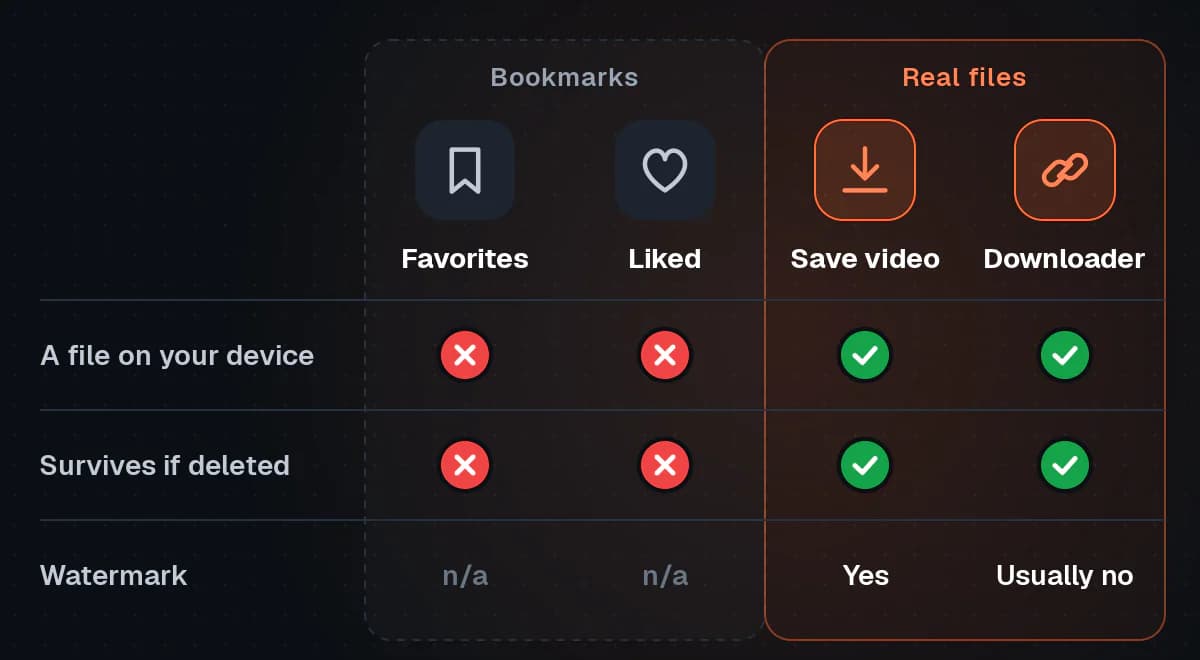
Favorites (the bookmark)
A private list of videos you want to find again, stored on your TikTok account, not on your phone. No file is created.
Liked videos (the heart)
Tapping the heart adds the video to the Liked tab on your profile. Like Favorites, it is a reference, not a file. Liked videos can be visible to others; to change that, open Settings and privacy, then Privacy, and set who can see your liked videos to "Only me".
"Save video" from the Share menu
This is the only built-in option that creates an actual file on your device. Tap the Share arrow on a video, then tap Save video. TikTok saves an MP4 file to your phone. That file normally carries the TikTok watermark with the creator's username. The option only appears when the creator has allowed downloads.
Drafts
Drafts are your own unposted videos, shown as a "Drafts" tile at the start of your profile grid. They are generally stored on the device where you made them, so deleting the app or switching phones can lose them. Save important drafts to your device first.
Why do TikTok saved videos disappear?
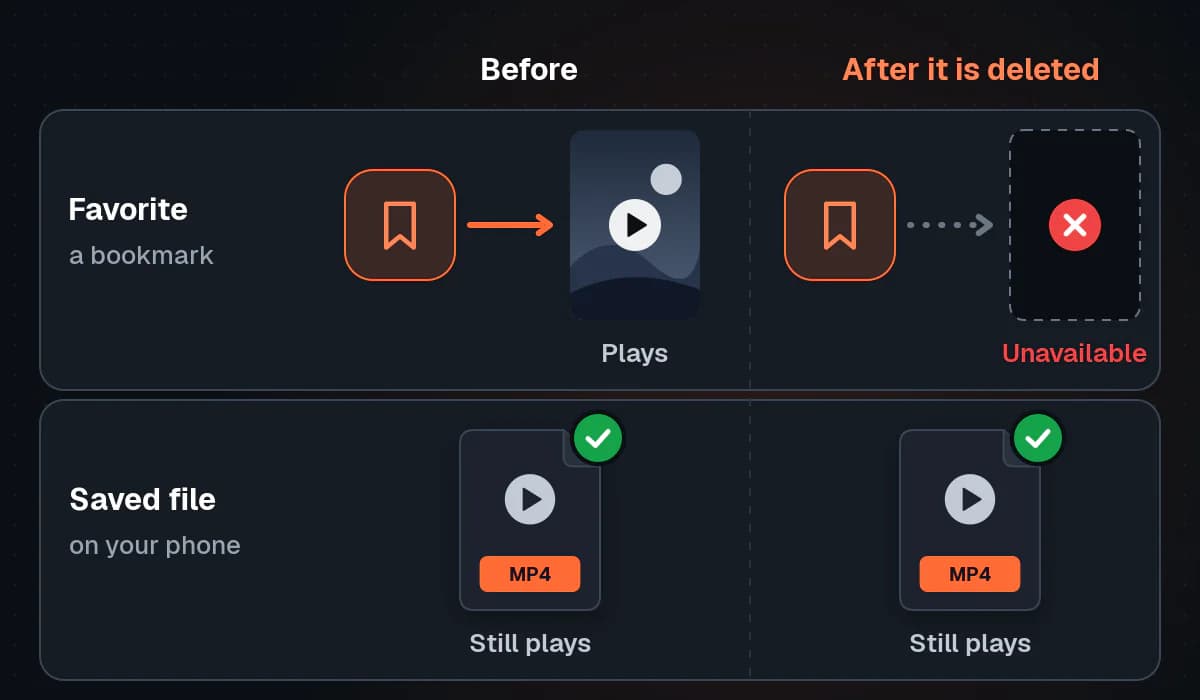
Because a favorite is a bookmark, it depends on the original video still being available. A saved video can vanish or show as "unavailable" when:
- The creator deleted it. The bookmark now points to nothing.
- The creator made it private or friends-only. You can no longer view it unless you meet the new audience setting.
- The creator deleted or deactivated their account, or the account was banned.
- TikTok removed the video for breaking its Community Guidelines, or because of a copyright claim on the music or footage.
- The video is restricted in your region or for your age group.
In each case, nothing in Favorites can bring it back. TikTok does not keep a personal copy for you.
That's the core lesson: a bookmark isn't a backup. A real copy on your device is, and the legitimate cases for keeping one are your own videos or videos the creator has let you keep.
How to download TikTok videos and keep a real copy
There are three ways, depending on whose video it is.
Option 1: Use TikTok's built-in "Save video"
This is the simplest way to download a video from TikTok when the creator allows it.
- Open the video in the TikTok app.
- Tap the Share arrow on the right side.
- In the bottom row of options, tap Save video.
- Wait for the progress bar to finish.
The result is an MP4 with the TikTok watermark, which credits the creator.
Warning: Important
If Save video is missing, the creator has turned downloads off. Respect that choice. Only download media you own or have permission to use.
Option 2: Use our browser-based downloader for a copy without the watermark
Sometimes you need a clean file, for example to re-edit your own videos, or to use a clip a creator has given you permission to use.
That is what our TikTok downloader is for. It runs in the browser on Android, iPhone and desktop, and you do not need an account or an app. Here is how to download TikTok videos with it:
- In the TikTok app, open the video, tap Share, then tap Copy link. If you are on a computer, our guide to getting a TikTok video's address covers the web version too.
- Open OrbitexAIO in your phone's or computer's browser.
- Paste the link. Short links like vm.tiktok.com/... or vt.tiktok.com/... work, as do full links in the form tiktok.com/@username/video/...
- Choose a format. You get the video without the TikTok watermark in "HD" and "Standard" quality, and an MP3 of the audio if you only need the sound.
- Download the file and save it to your device.
What to expect from the downloader
We don't promise specific resolutions such as 1080p or 4K, because what you get depends on what TikTok serves (why a clip may top out below 1080p explains the reasons). If TikTok only provides a watermarked version of a video, we offer that version and label it clearly as watermarked. Photo-mode slideshows (they have no video file), live broadcasts, and anything private, friends-only or behind a login can't be downloaded. And the rule we ask everyone to follow applies everywhere: only download media you own or have permission to use.
Option 3: Request "Download your data" for your own account
If your goal is to back up your own TikTok history, TikTok provides an official route. (For a wider look at keeping copies of videos you posted yourself on any platform, we have a separate guide.)
- Go to Profile and tap the menu icon (three lines) at the top right.
- Tap Settings and privacy.
- Open Account, then Download your data.
- Choose the file format (TikTok typically offers a readable text format and a machine-readable JSON format) and choose which data to include.
- Submit the request.
- Come back to the same screen and check the Download data tab. Preparing the file can take from several hours to a few days.
- When the file is ready, download it promptly. TikTok only keeps it available for a limited time, after which you need to request it again.
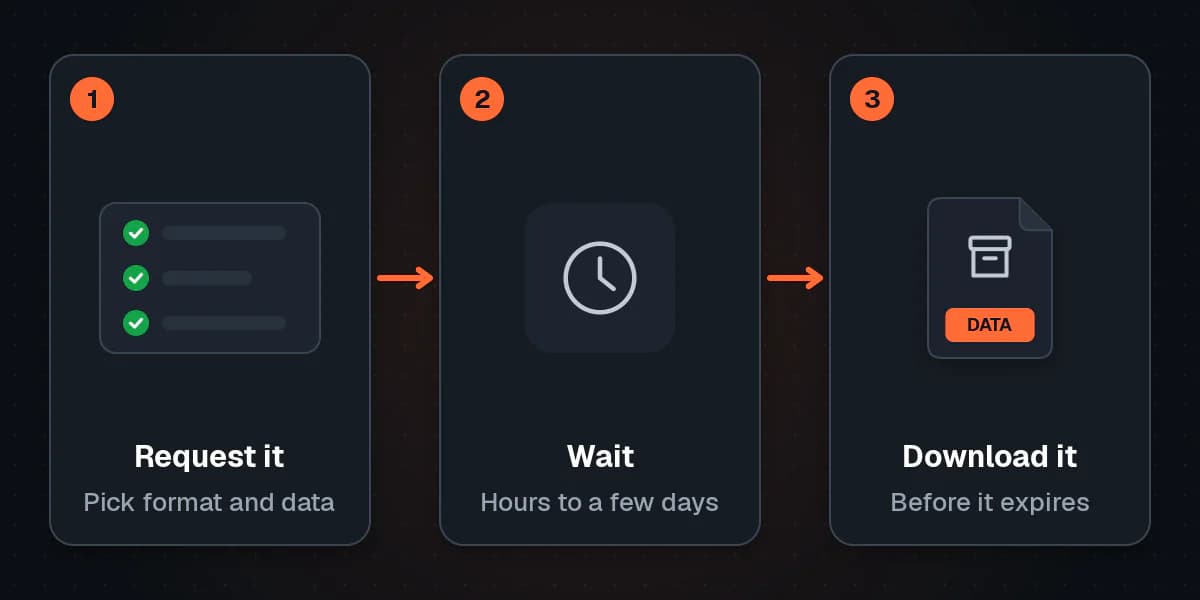
The archive is a record of your own account and activity, such as lists of your favorites and likes. It is not a folder of other people's videos, so check the contents once you have it.
Where do downloaded TikTok videos go on iPhone and Android?
Once you have a file, you need to know where to find it.
On iPhone
- TikTok's "Save video": the video goes straight to the Photos app, under Recents. The first time, iOS asks for permission to add to your photos. If you declined, go to the iPhone Settings app, find TikTok, open Photos, and allow access.
- Our downloader in Safari: files usually go to the Files app, in the Downloads folder (on iCloud Drive or On My iPhone, depending on your Safari settings). To move a video into Photos, open it in Files, tap the Share icon, and choose Save Video.
On Android
- TikTok's "Save video": open your Gallery app (or Google Photos). The video usually appears among recent items or in a folder named after TikTok or your camera roll.
- Our downloader in Chrome: files go to the Downloads folder. Open the Files app (or "My Files" on Samsung phones) and tap Downloads, or open Chrome's menu and tap Downloads. Most gallery apps pick up the new MP4 automatically.
If a video still won't show up, our step-by-step guide on getting a TikTok video into your Android gallery goes further.
On desktop
Your browser saves the file to your default Downloads folder unless you have chosen a different location. Video downloads arrive as MP4 files; how MP4 compares with WebM is covered in a separate post.
Comparison: which option actually keeps a copy?
| Method | Is it a file on your device? | TikTok watermark? | Survives if the creator deletes the video? | Works for other people's videos? |
|---|---|---|---|---|
| Favorites (bookmark) | No | Not applicable | No | Yes, as a bookmark only |
| Liked videos (heart) | No | Not applicable | No | Yes, as a reference only |
| Share, then Save video | Yes (MP4) | Yes | Yes | Only if the creator allows downloads |
| OrbitexAIO downloader | Yes (MP4 or MP3) | Usually no; labelled if only a watermarked copy exists | Yes | Only public videos, and only with permission to use them |
| Download your data | Yes (data archive) | Not applicable | Yes, for what the archive includes | No, it covers your own account |
Troubleshooting common problems
The "Save video" option is missing
This is the most common reason people search "why can't I save a TikTok video". The answer is almost always that the creator has switched off downloads for their videos. TikTok hides the option when that setting is off. It can also be missing on some accounts, such as those of younger users, where downloads are restricted by default.
The right response is to respect the setting. Bookmark the video instead, or message the creator and ask. If it is your own video, open Settings and privacy, go to Privacy, and look for the Downloads setting to turn it back on.
My Favorites tab is empty
- Check the account. You may be signed in to a different TikTok account.
- Check your collections. Videos may be filed there, not in the main grid.
- Update the app and refresh with a good connection.
- Try the website. If your saved videos show on tiktok.com, the problem is the app. Clearing TikTok's cache or reinstalling usually fixes it.
A saved video says "unavailable" or "video not available"
The original video was deleted, made private, removed by TikTok, or restricted in your region. The bookmark remains but has nothing to show. You can remove it from your Favorites to tidy up. Unless you saved a real copy earlier, there is no way to recover it from TikTok.
A photo post has no video to save
Photo-mode posts are slideshows of still images, often with music. There is no video file behind them, so video download options will not work. Depending on the post and the creator's settings, TikTok may let you save individual photos. You can also save the post to Favorites to find it again.
The video is private or friends-only
You can only watch these if the creator has approved you. You can't download them with our downloader either, because it only reaches public videos. If you need the video, ask the creator directly.
FAQ
How do I find saved videos on TikTok?
Tap Profile, then the bookmark icon in the row above your video grid. This opens Favorites, where your saved videos appear. On the website, click the Favorites tab on your profile.
Are TikTok saved videos stored on my phone?
No. Favorites are bookmarks stored on your TikTok account. Only the Share menu's Save video, a downloader, or a data download puts an actual file on your device.
Can other people see my TikTok favorites?
Your Favorites are private by default. Your Liked videos can be visible to others, which you can change under Settings and privacy, then Privacy. If you make a collection public, others may be able to see it.
Why did a video disappear from my TikTok saved videos?
Usually because the creator deleted it, made it private, or deleted their account, or because TikTok removed it. Since a favorite is only a bookmark, it disappears when the original does.
How do I download a video from TikTok without the watermark?
TikTok's built-in Save video adds a watermark. For a copy without it, paste the video link into OrbitexAIO and save an MP4. Use this only for your own videos or ones you have permission to keep. More answers about the tool are in our general FAQ.
Can I recover a deleted TikTok video I had saved?
Not from Favorites. Once the creator deletes it, TikTok does not keep a copy for you. If it was your own video, check your phone's gallery and your Download your data archive.
Is it legal to download TikTok videos?
Downloading your own videos is fine. For other people's videos, the safe rule is to respect the creator's download setting and only keep or reuse content when you have permission. Re-uploading someone else's video as your own breaks TikTok's rules and may infringe copyright.
Conclusion
Your TikTok saved videos are one tap away: Profile, then the bookmark icon. But Favorites and Liked videos are bookmarks, and they vanish when the original goes. When a video matters, keep a real copy: Save video when the creator allows it, a clean, watermark-free file from OrbitexAIO for content you own or may use, and Download your data for your own account. Saving from other apps too? Here is every platform we support. Respect creators' choices, and your collection stays both organised and safe.