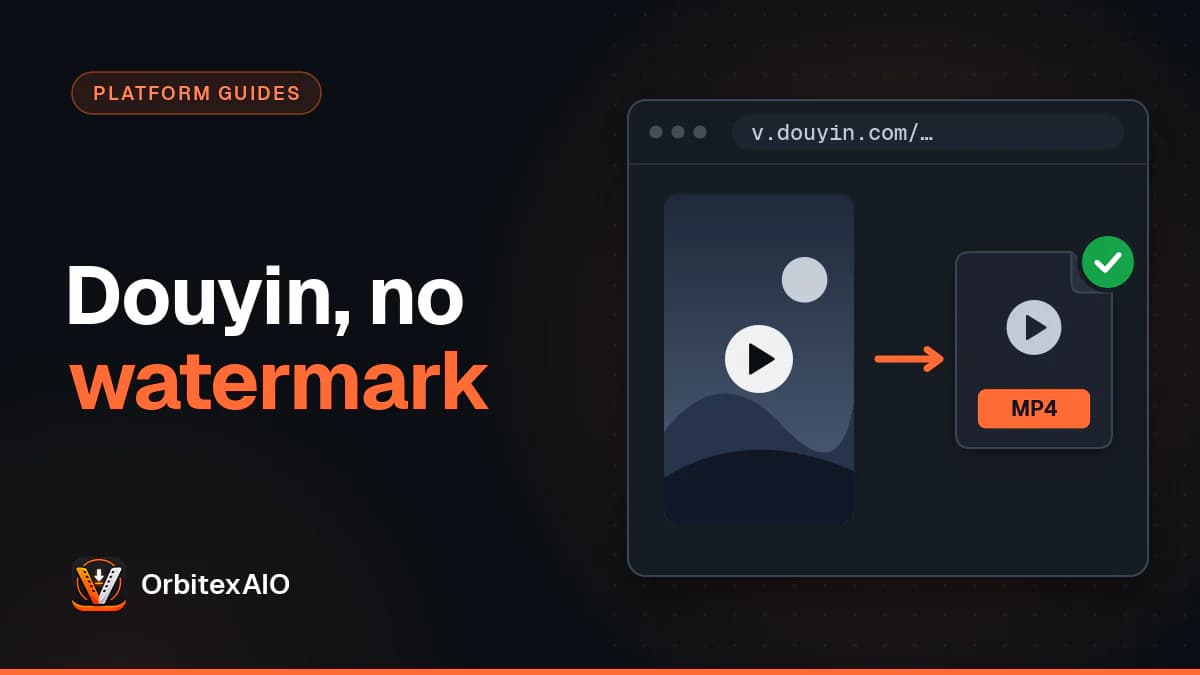
To download a Douyin video without the watermark, copy the video's link from the Douyin app or douyin.com, paste it into our Douyin downloader, and save the clean MP4 when the platform offers one. Douyin is not TikTok, so a TikTok link will not find a Douyin video, and a tool built only for TikTok will not read a Douyin link. This guide explains what a Douyin video downloader without watermark actually does, how Douyin differs from TikTok, the exact steps with the Chinese labels, and what to do when it doesn't work.
Quick answer
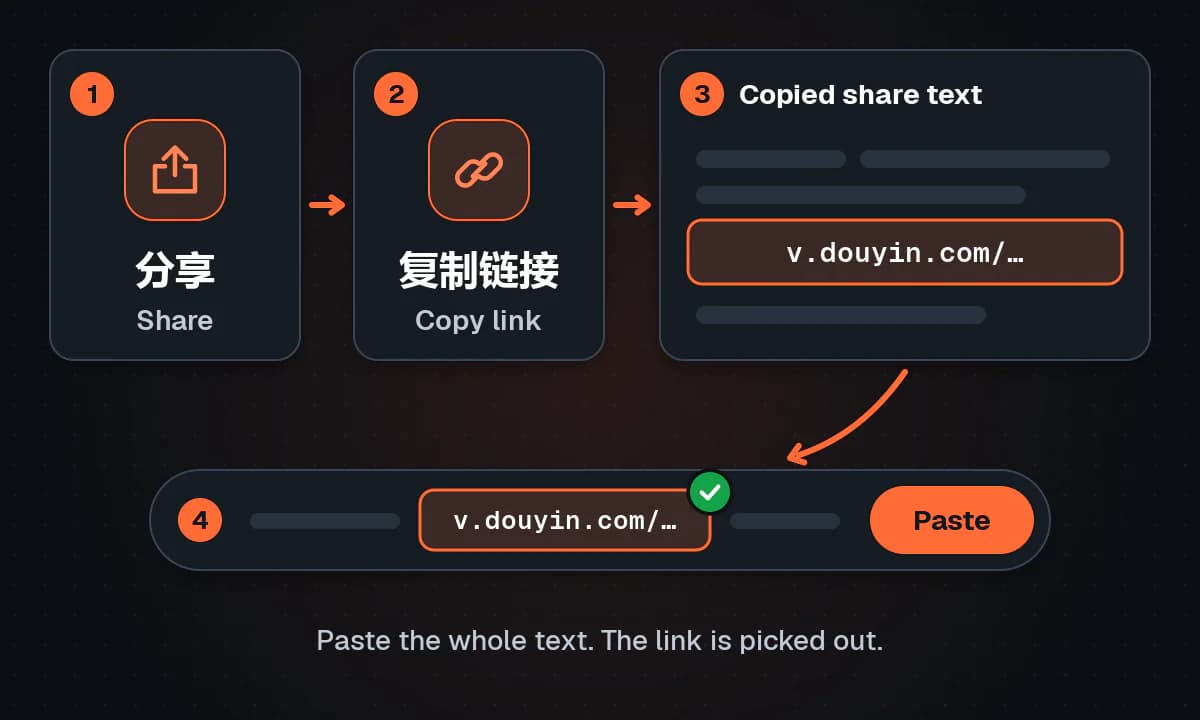
- Open the video in the Douyin (抖音) app and tap the 分享 (Share) arrow.
- Tap 复制链接 (Copy link). You now have a v.douyin.com short link wrapped in Chinese text.
- On a computer, open the video on douyin.com and copy the douyin.com/video/ address instead.
- Paste the link into OrbitexAIO. You can paste the whole share message without cleaning it up.
- Choose the clean (non-watermarked) MP4 if one is listed, or the MP3 if you only want the audio.
- Only save videos you own or have permission to use.
Douyin vs TikTok: is Douyin the same as TikTok?
No. Mixing them up is behind many failed downloads, and it's why a Douyin download (抖音 下载) needs a Douyin tool, not a TikTok one.
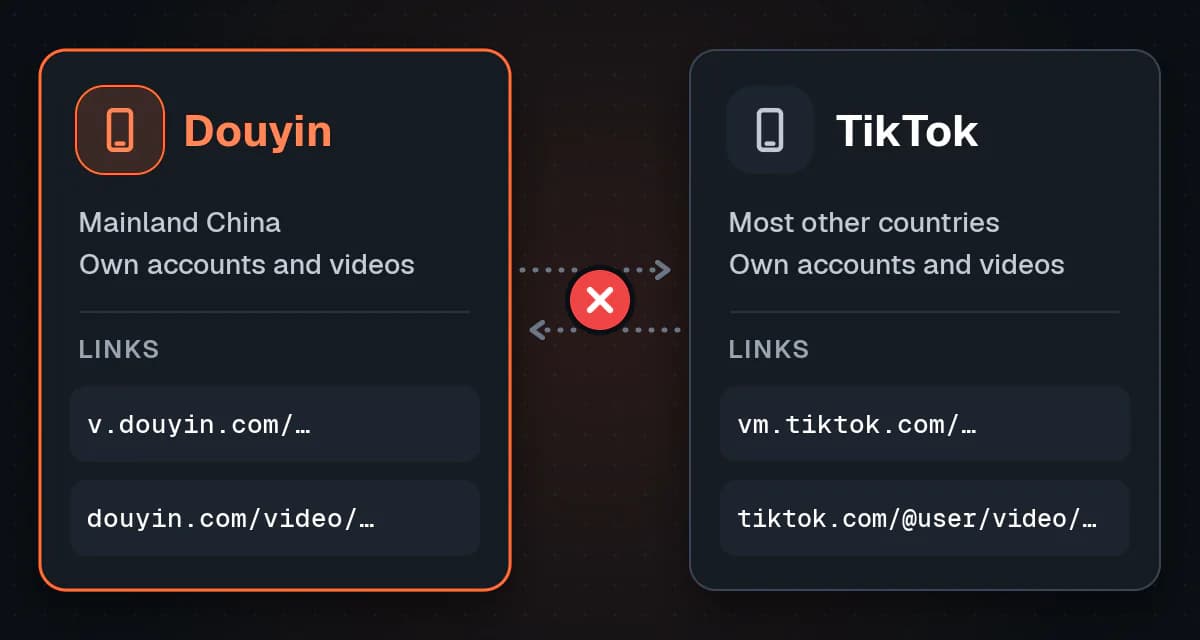
Douyin (抖音, roughly "shaking sound") and TikTok are both made by ByteDance, and they look almost identical. But they are two separate apps. Douyin serves mainland China. TikTok serves most of the rest of the world and is not offered in mainland China. Each has its own servers, its own creators, its own accounts and its own links.
In practice that means a video you saw on Douyin may not exist on TikTok at all. A Douyin link will not open in TikTok, and a TikTok link will not open in Douyin. If the clip you want really is on TikTok, use a downloader made for TikTok links instead.
| Douyin (抖音) | TikTok | |
|---|---|---|
| Owner | ByteDance | ByteDance |
| Main market | Mainland China | Most countries outside mainland China |
| App store availability | Mainly Chinese app stores; usually not listed in other regions' stores | Global app stores; not offered in mainland China |
| Content catalogue | Separate; mostly Chinese-language creators | Separate; international creators |
| Link format | v.douyin.com/... short links, douyin.com/video/ plus a numeric ID | vm.tiktok.com/..., tiktok.com/@user/video/ plus a numeric ID |
| Share text | Link wrapped inside Chinese text and a code | Usually just the link, or a short caption |
| Watermark | Douyin logo plus the creator's 抖音号 (Douyin ID) on saved copies | TikTok logo plus the creator's @username on saved copies |
| Accounts | Separate account; sign-up is built around a Chinese phone number | Separate account; a Douyin login does not work here |
App store listings and sign-up rules change by region, but the core point holds: two apps, two catalogues, two sets of links.
Why Douyin videos have a watermark
When you save a video inside the Douyin app (when the creator allows it), the copy you get is stamped. It usually shows the Douyin logo and the creator's 抖音号, the ID that identifies their account. It often moves around the frame so it is hard to crop out.
The watermark credits the creator when a clip is passed around on WeChat or other apps, and it advertises Douyin wherever the video travels.
The useful detail for anyone saving their own content is this: the watermark is not always burned into the only copy. Douyin often serves a separate clean version for normal playback in the app and on the web. Our downloader asks for that clean version, a different file Douyin itself publishes, rather than painting over the logo.
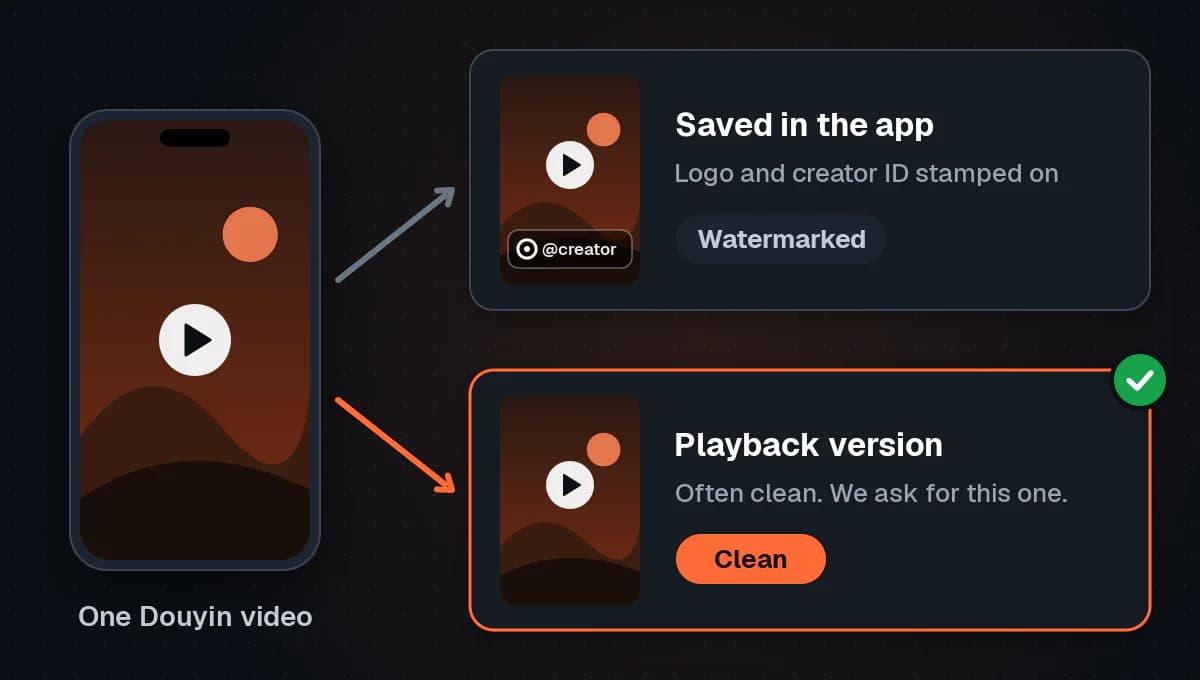
If Douyin only provides a stamped copy of a particular video, we say so. You are shown a watermarked option, clearly labelled, not a watermarked file dressed up as clean.
How to get a Douyin video link
You need a link to one specific video, not to a profile, a hashtag page or search results.
On your phone: the Douyin app
The Douyin app is in Chinese, but the share flow is short.
- Open the video you want so it plays full screen.
- Tap the share arrow on the right-hand side of the screen, below the like and comment icons. The label under it reads 分享 (fēnxiǎng, "Share"). On some videos the icon shows only a number, which is the share count.
- In the share sheet that slides up, tap 复制链接 (fùzhì liànjiē, "Copy link"). It sits among the action icons, and you may need to swipe that row sideways to find it.
Paste it into a notes app and you'll see it isn't a clean URL. It will look something like a line of Chinese text: a short code, the video caption, then a https://v.douyin.com/... short link, and often a sentence inviting the reader to open Douyin to watch.
That is normal. The v.douyin.com link is a short redirect to the full video page.
Note: Note
The share sheet may also show an option to save the video to your device. That saves the watermarked copy, and it only appears when the creator has allowed downloads. The labels and order in this sheet change between app versions, so look for the icons rather than an exact position.
On a computer: douyin.com
You don't need the app to get a link.
- Go to douyin.com in your browser.
- Open the video you want. Make sure it is playing on its own page, not just previewing in the feed.
- Look at the address bar. The full form is https://www.douyin.com/video/ followed by a long number. That number is the video's ID.
- Copy the whole address.
If the address bar shows a feed, user page or search URL, click into the video itself first. If a login prompt blocks you on the website, use the app route instead.
Which link formats work?
Our Douyin page accepts all three of these:
- Short share links: v.douyin.com/xxxxx
- Full video URLs: douyin.com/video/ plus the long numeric ID
- Web share links: iesdouyin.com/share/video/ plus the ID
How to download a Douyin video without the watermark
Getting a Douyin no-watermark copy doesn't require an app or an account. OrbitexAIO runs in the browser, so it works the same on Android, iPhone, Windows or Mac.
Step 1: Paste the link
Copy the link using either method above, open the Douyin page on OrbitexAIO in any browser, and paste it into the input box. It accepts the whole copied share message, Chinese text included, and picks out the v.douyin.com link on its own.
If the pasted text was cut off or mangled on the way, delete everything except the https://v.douyin.com/... part and try again. For a closer look at what happens after you paste, see how the downloader works.
Step 2: Pick the right file
Once the link is read, you'll normally see a few options:
- MP4 video, clean: the version without the Douyin logo and 抖音号. Choose this if it's offered.
- MP4 video, watermarked: offered when Douyin serves only a stamped copy of that video.
- MP3 audio: just the soundtrack, useful if you only want the voiceover or music.
Check the resolution shown. It is the real resolution Douyin makes available, and a 720p clip is never upscaled and relabelled "1080p". If a clip tops out lower than you expected, here is why some videos stop short of 1080p.
Step 3: Save it
Tap or click the download button.
- On Android, the file usually lands in your Downloads folder.
- On iPhone and iPad, Safari saves to the Files app, under Downloads by default. From there you can use the share button to save the video to Photos.
- On a computer, it goes wherever your browser saves downloads.
What can't be downloaded
Some Douyin content has no video file to save. No reputable Douyin downloader can get around these, and you should be wary of any tool that claims it can.
图文 image posts
Douyin has a post type called 图文 (túwén, "image and text"). It's a slideshow of photos with a soundtrack, and it looks like a video when it plays in the feed. But there's no single video file behind it, only still images and a sound. A video downloader will return an error or "no video found" for these.
Live broadcasts
A live stream that's still going on has no finished file and no permanent address. Unless the creator later posts a recording as a normal video, there's nothing to download.
Private, friends-only and login-restricted videos
If a creator makes a video private, limits it to friends, or it can only be seen while logged in to a particular account, Douyin doesn't serve it publicly. We only fetch what Douyin already shows to the public. We won't use your login or try to reach restricted posts.
Region-restricted videos
Some Douyin content is limited by region. If Douyin declines to serve a video to our servers, the download fails because there is nothing to retrieve.
Troubleshooting Douyin downloads
"Link not working" or "invalid URL"
Check these in order:
- Is it a single video? Profile, hashtag and search links won't work. Open the specific video and share or copy from there.
- Did you copy all of it? Short links are easy to cut off. The code after v.douyin.com/ must be complete.
- Did extra text break it? The full share message normally works, but if something went wrong while copying, paste only the https://v.douyin.com/... part.
- Is the link old? Copy a fresh link from the app. It takes five seconds and rules out a stale redirect.
You pasted a TikTok link by mistake
The apps look alike, but a tiktok.com or vm.tiktok.com link belongs to a different platform with a different catalogue. The Douyin tool won't read it, and the same video may not exist on Douyin at all.
Paste TikTok links into our TikTok page and keep Douyin links for the Douyin one.
The post has no video
If you get "no video found" for something that seemed to play, it's almost certainly a 图文 image post. Look at it in the app: if you can swipe through photos, or a small page indicator appears, it's an image set. There's no MP4 to save.
The video was removed or made private
If the video no longer plays in the Douyin app for a logged-out viewer, a downloader can't get it either. The creator may have deleted it, set it to private, or restricted who can see it. If you need it, ask the creator for a copy.
The video is region-restricted
Some content is only served in certain regions, or not at all to requests from outside China. If the video plays for you but the download still says it's unavailable, a regional restriction is a likely cause. There isn't a legitimate workaround on our side.
Is it legal to download Douyin videos?
This depends on your country's law and on what you do with the file. This isn't legal advice, but some principles are safe to follow.
Saving your own videos is fine. Creators often want a clean copy as a backup, or to post on their own accounts elsewhere. We cover the official routes in getting your own uploads back from each platform.
Saving with permission is fine. If a creator or brand has agreed that you can use their clip, for example in a collaboration or a licensed campaign, downloading it for that purpose is reasonable. Get that permission in writing where you can.
Warning: Important
Re-uploading someone else's video as your own is not okay. Removing the watermark doesn't remove the creator's rights. Posting another person's work on TikTok, YouTube Shorts or Instagram without permission can infringe their copyright and break those platforms' rules, and it takes views and income away from the person who made it. A simple test: if the creator saw what you did with their video, would they be happy? If not, don't do it.
Personal viewing is a grey area. Rules vary by country, and Douyin's own terms set limits. If you're unsure, use Douyin's built-in save option where the creator allows it, which keeps the credit on the video.
FAQ
Is Douyin the same as TikTok?
No. ByteDance owns both, but they're separate apps for different markets. Douyin serves mainland China and TikTok serves most other countries. They have separate catalogues, accounts and links, and a link from one won't open on the other.
How does a Douyin video downloader without watermark work?
It reads the video's link, finds the renditions Douyin itself serves, and offers the clean one when it exists. Copy the link with 分享 (Share) then 复制链接 (Copy link) in the app, or from the address bar on douyin.com, paste it in and choose the clean MP4 option. If only a watermarked version exists, that's what you'll be offered.
What is a v.douyin.com link?
It's Douyin's short share link. When you tap Copy link in the app, Douyin gives you a v.douyin.com address inside some Chinese text. It redirects to the full douyin.com/video/ page.
Can I paste the whole Douyin share text, Chinese included?
Yes. OrbitexAIO picks the link out of the text automatically. If a copy got cut off along the way, delete everything except the https://v.douyin.com/... link and paste that.
Why does my Douyin link say "no video found"?
Usually it's a 图文 image post, which contains photos and a sound but no video file. It can also mean the video was deleted, made private, or is region-restricted.
Can I download Douyin videos on iPhone?
Yes, through Safari or any other browser, with no app to install. The file saves to the Files app, and from there you can save it to Photos.
Can I download only the audio from a Douyin video as MP3?
An MP3 of the soundtrack is often offered alongside the video. Remember that the music in a clip is often licensed to Douyin, not to you, so reusing it elsewhere may not be allowed.
Can I download private Douyin videos?
No. Private, friends-only and login-restricted videos aren't served publicly, and a legitimate tool won't try to get around that.
Conclusion
Most Douyin download problems come from two things: treating Douyin as if it were TikTok, or copying the wrong kind of link. Copy the link from a single video with 分享 then 复制链接, or from the douyin.com/video/ address bar, and paste it into a tool built for Douyin. You'll usually get a clean MP4 in a few seconds.
Know the limits too. Image posts, live streams and private videos have nothing to download. Keep what you save to your own videos, or to ones you have permission to use, and leave the credit with the creator who made it.
Douyin is not the only Chinese platform we cover: there are also pages for Xiaohongshu (RedNote) and Bilibili.