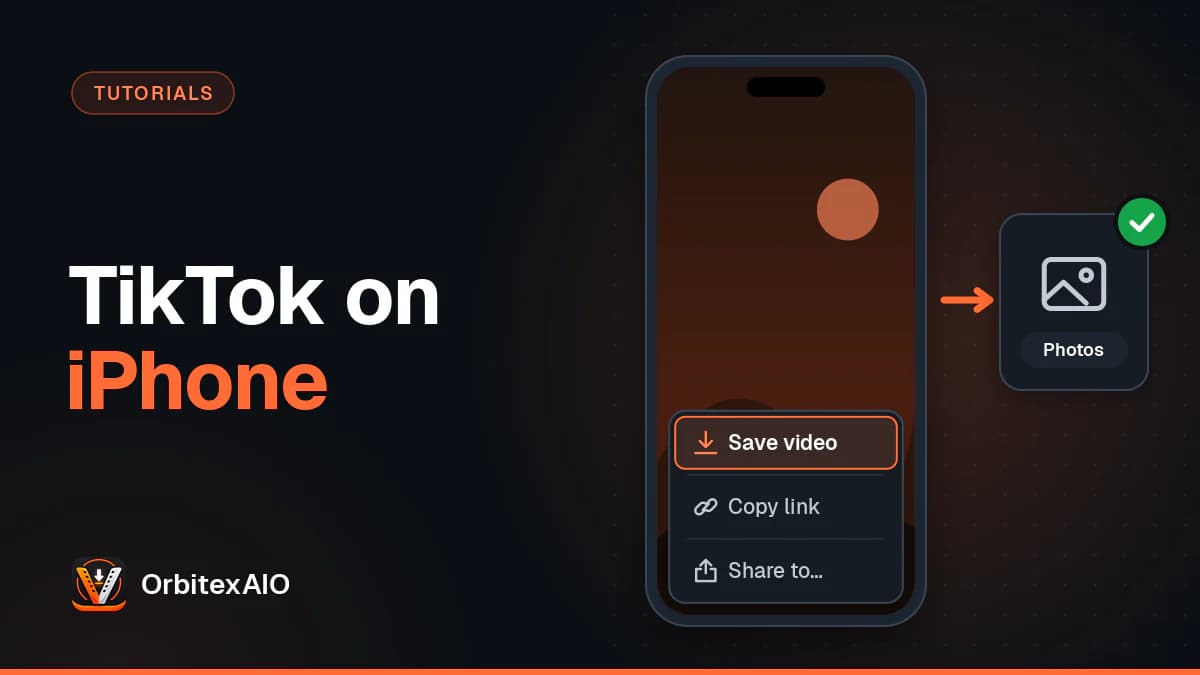
To download a TikTok video on iPhone, play the video, tap the Share arrow on the right and choose Save video. TikTok writes the clip straight to your Photos library, with its watermark, as long as the creator allows downloads. For a copy without the logo, copy the link, paste it into a browser-based downloader in Safari, then move the file from the Files app into Photos.
Quick answer
- Open the TikTok video on your iPhone.
- Tap the Share arrow on the right side of the screen.
- Tap Save video in the lower row of the share sheet.
- If TikTok asks for access to your photos, allow it.
- Open the Photos app. The video is at the bottom of your Recents, newest first.
Method 1: Save the video from inside the TikTok app
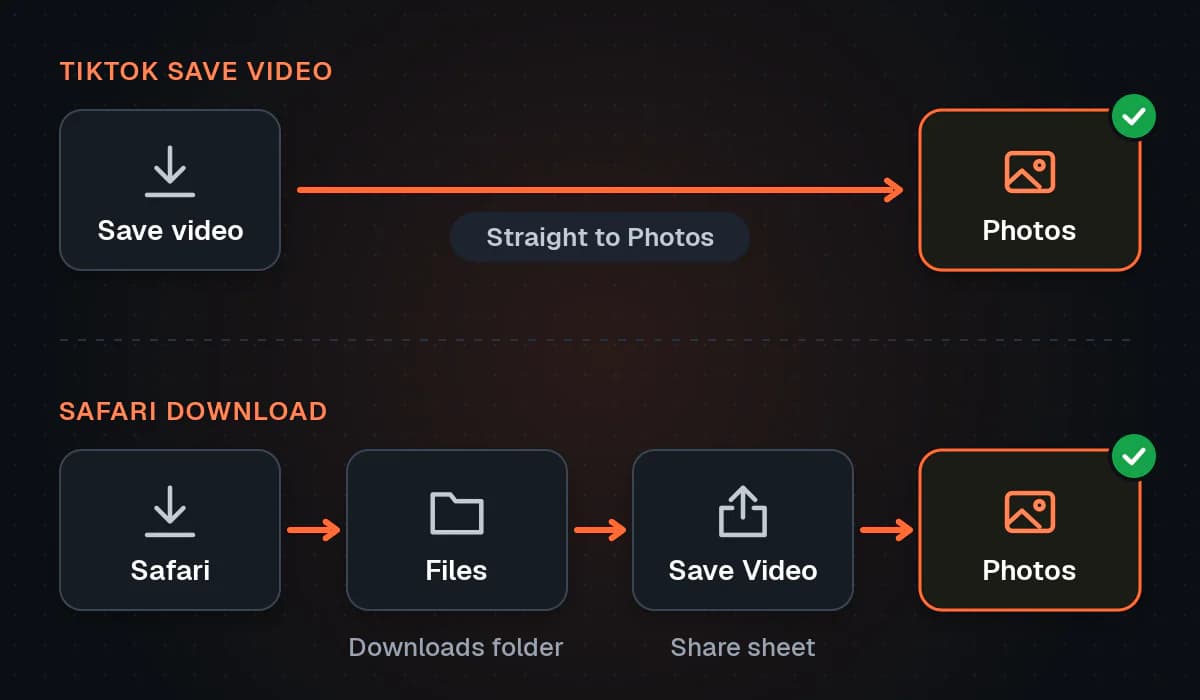
This is the route TikTok designed for the job, and on an iPhone it has one real advantage over everything else: the file goes directly to your camera roll. There is no Downloads folder to dig through and no second step.
Steps
- Open TikTok and find the video. It can be in your For You feed, on a profile, or in a chat someone sent you.
- Tap the Share arrow. It sits in the column of icons on the right, under the comment and bookmark buttons.
- Look along the lower row of the sheet that slides up. Save video is usually near the start, beside options such as Duet and Stitch. Swipe the row to the left if it is out of view.
- Stay on the screen while the progress ring fills. A short confirmation appears when the video has been saved.
The Photos permission prompt
The first time you save anything, iOS shows a prompt asking whether TikTok may add to or access your Photos. The save only works if you allow it. If you tapped the wrong choice earlier, open the iPhone Settings app, scroll to TikTok (on recent iOS versions it lives under Apps), tap Photos and pick an option that lets TikTok add items. Adding only is enough for saving videos.
What ends up in Photos
- A moving watermark with the TikTok logo and the creator's username, stamped on every video saved this way.
- An MP4 file with the original sound, compressed the way TikTok delivers it for playback.
- No button at all when the creator has switched downloads off for their account or for that post.
Do not confuse Save video with the bookmark icon or Add to Favorites. Those keep a pointer inside TikTok and put nothing on your phone, so the clip is gone if the creator deletes it. We compare the two in Favorites vs real copies of TikTok videos.
Method 2: Download a TikTok video without the watermark in Safari
The watermark is harmless when you only want to rewatch a clip. It gets in the way when you are reposting your own video to Reels or Shorts, or editing a clip you have permission to use, because the bouncing logo sits on top of the picture.
You do not need an App Store app for this, which is good news: many apps sold as a TikTok video saver are thin wrappers full of ads. Safari can do the whole job with our TikTok downloader, with no account and nothing to install. Chrome or any other browser on your iPhone works the same way.
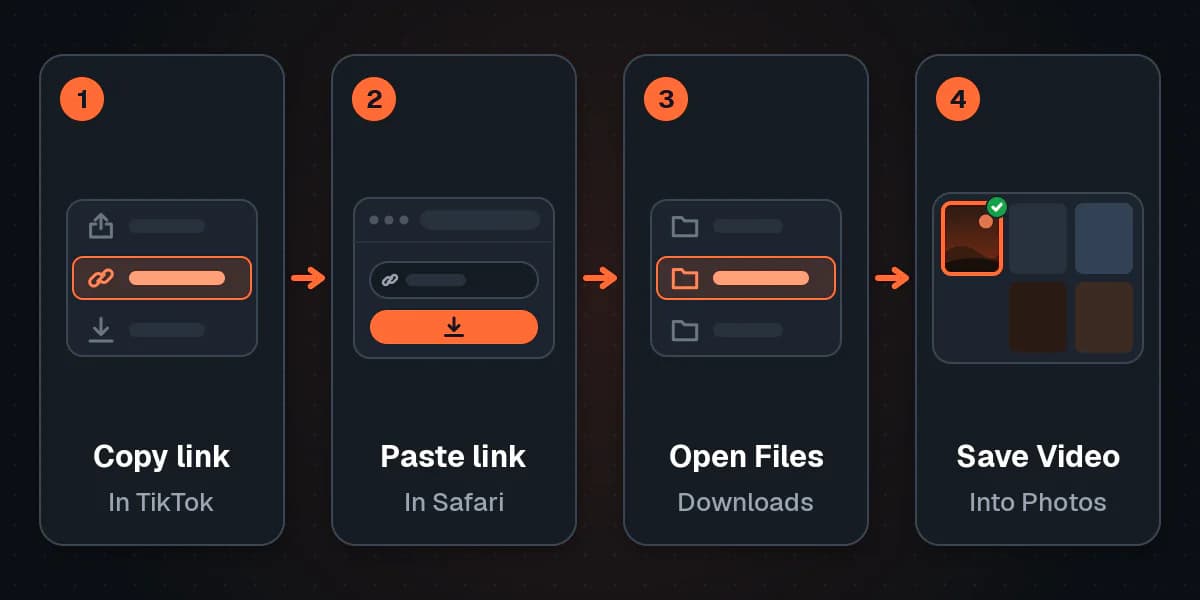
Step 1: Copy the link
- In TikTok, open the video and tap the Share arrow.
- Tap Copy link in the top row. A short confirmation shows that it is on your clipboard.
The app gives you a short link starting with vm.tiktok.com or vt.tiktok.com. That is fine, and so is a full tiktok.com/@username/video/ address from the website. If you are unsure which one you have, our guide on where a TikTok video URL comes from explains both.
Step 2: Paste it and download in Safari
- Open Safari and go to the OrbitexAIO TikTok page.
- Tap the input box, tap it again, and choose Paste from the small menu.
- Start the lookup and wait a moment for the formats to appear.
- Choose a version. Normally you get HD and Standard without the watermark, and an MP3 of the audio. When TikTok only makes a watermarked copy available for a post, we still offer it but label it as watermarked, so there are no surprises.
- Tap the download button. Safari may ask whether you want to download the file; confirm it.
- A download arrow appears in the address bar while the file comes in. Tap it to see progress, and tap the magnifying glass next to the finished file to open its folder in Files.
Note: Note
HD means the best version TikTok itself serves for that video, not a promise of 1080p or 4K. A downloader cannot add detail that was never uploaded. Our guide to HD TikTok downloads goes into what the labels mean.
What Safari and our downloader cannot fetch
- Photo-mode slideshows. They are still images with a soundtrack, not a video file.
- Private, friends-only or login-restricted videos. We see TikTok the way a logged-out visitor does, which how OrbitexAIO works explains in more detail.
- LIVE broadcasts. A stream in progress is not a finished file.
Method 3: Move the download from Files to Photos
This is the step that trips up most iPhone users. Unlike TikTok's own button, a download from Safari does not land in Photos. It goes to a Downloads folder in the Files app, and you have to move it across yourself. It takes about ten seconds once you know where to look.
Find the Downloads folder
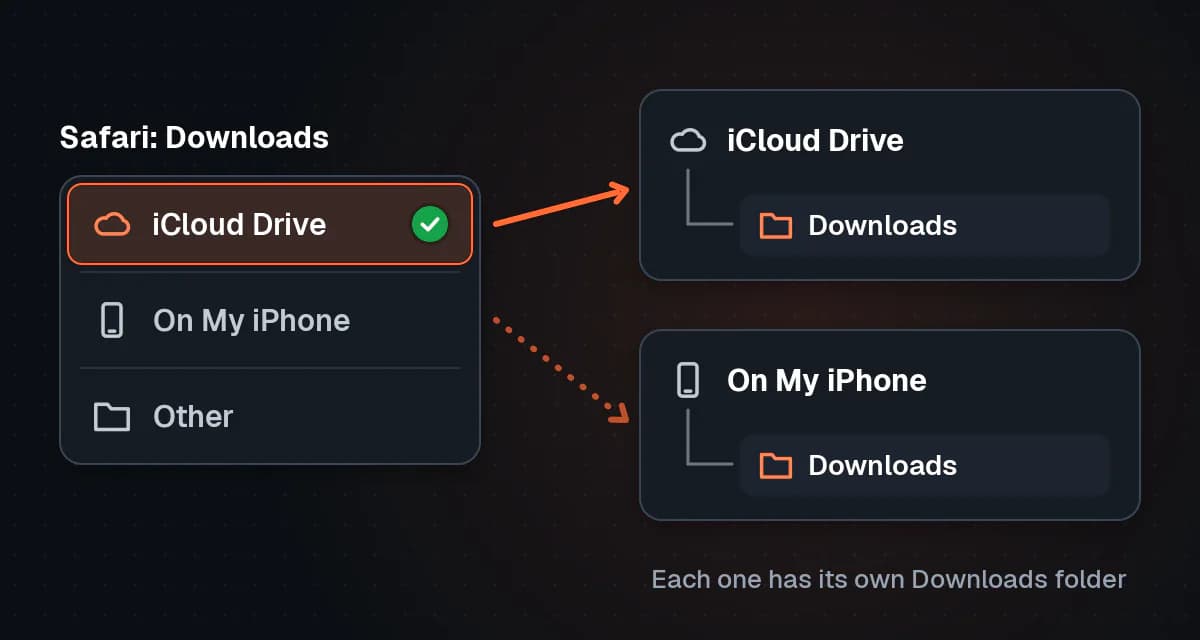
Where that folder lives depends on a Safari setting. Open the Settings app, go to Safari (under Apps on recent iOS versions) and tap Downloads. You will see one of these:
- iCloud Drive. Files go to iCloud Drive, in a folder named Downloads. They sync to your other devices and count against your iCloud storage.
- On My iPhone. Files stay on the phone only, in a Downloads folder under On My iPhone.
- Other. A folder you picked yourself.
If you have a slow connection or a nearly full iCloud plan, switching to On My iPhone makes downloads faster and more predictable.
Save the TikTok to your camera roll
- Open the Files app and tap Browse at the bottom.
- Open iCloud Drive or On My iPhone, depending on the setting above, then open Downloads.
- Tap the video to open the preview. Check that it plays and has sound.
- Tap the Share button (the square with an arrow pointing up) in the corner.
- Scroll down the share sheet and tap Save Video.
- Open Photos. The clip is now in Recents and in the Videos album.
Once it is in Photos, you can delete the copy in Downloads to avoid keeping the same file twice. For an MP3, there is no Save Video option, because Photos does not hold audio. Keep it in Files or open it in an app that plays or edits sound.
Method 4: Save your own TikTok videos
If the clip is yours, you have cleaner options than downloading it back from your profile. Our overview of getting your own uploads back from social platforms covers the full account export too.
Keep a copy as you post
- Record or upload your video and edit it as usual.
- On the final screen where you write the caption, open More options (or the settings area near the bottom).
- Turn on the toggle that saves the video to your device. Its exact wording varies between app versions.
- Post. TikTok adds a copy to your Photos library as it uploads, without the watermark.
Save something you posted earlier
- Go to your profile and open the video.
- Tap the Share arrow or the three-dot button.
- Tap Save video. This copy has the watermark.
Missing on your own video? Your downloads setting is probably off, and TikTok hides the button from you as well. Go to Profile, tap the menu in the top right, then Settings and privacy, Privacy and Downloads. Switch it on, save the clip, and switch it off again if you prefer. For a watermark-free copy of a public video you no longer have the original for, paste the link into OrbitexAIO exactly as in Method 2.
Drafts work the same way as on other phones: set the draft to Only me, turn on the save-to-device toggle, and post it privately. The steps are identical to the ones in our Android guide to saving TikToks, which is also the one to send to anyone in your family who is not on an iPhone.
Comparison: which iPhone method fits
| Method | Watermark | Where the file goes | Extra steps | Works on |
|---|---|---|---|---|
| TikTok Save video | Yes, logo and username | Photos, directly | None | Any video whose creator allows downloads |
| Safari and OrbitexAIO | No in most cases, labelled when it is | Files, in Downloads | Move to Photos with Save Video | Public videos you have permission to use |
| Save to device while posting | No | Photos, directly | Toggle before posting | Your own new posts |
| Only me draft workaround | No | Photos, directly | Post privately first | Your own drafts |
The format is the same in every row: an MP4, which plays in Photos and imports into iMovie, CapCut or any other editor without converting it first.
Troubleshooting on iPhone
There is no Save video option
- The creator has turned off downloads. This is the usual cause, and it is a deliberate choice. Ask them for the file instead.
- It is your own video. Your Downloads privacy setting is off, which hides the button for you too.
- The account or post is restricted. TikTok limits downloads on accounts of younger users and on some content.
- The row is scrolled. Swipe the lower row of the share sheet left before giving up.
The download went to Files, not Photos
That is normal for anything downloaded in Safari. iOS keeps browser downloads in Files and never adds them to Photos on its own. Open Files, go to Downloads, open the video and use Save Video from the share sheet, as described in Method 3. If Downloads looks empty, check the other location: iCloud Drive and On My iPhone each have their own Downloads folder.
Save Video is missing from the share sheet
- Scroll down. Save Video sits in the list of actions below the rows of apps and contacts.
- Check the file type. An MP3 has no Save Video action because it is audio. Download the HD or Standard version instead.
- Let the download finish. A file that is still coming in, or one that stopped halfway, cannot be saved. Delete it and download again.
- Download it to the phone. A file that exists only in iCloud Drive has to download first; tap it and wait for the cloud icon to clear.
Not enough storage
A TikTok of a minute or two is normally a few megabytes to a few tens of megabytes, so a storage warning means the phone really is close to full. Open Settings, General, iPhone Storage to see what is using space. Offloading unused apps, clearing old downloads in Files and emptying Recently Deleted in Photos all help. TikTok's own cache can grow large too; you can clear it in the app under Settings and privacy.
It is a photo post, not a video
Photo-mode posts are a set of still images played with music. There is no video file behind them, so neither Save video nor a downloader produces an MP4. If the creator allows it, TikTok may let you save the individual photos from the share sheet.
The video is private or friends-only
Only people the creator has approved can watch it, and no legitimate tool gets around that. Pasting the link into a downloader will return an error. If it belongs to a friend, ask them to send you the file through AirDrop or a message.
Warning: Important
Only download media you own or have permission to use. A creator who switches downloads off is telling you they do not want copies passed around, and removing a watermark does not remove their copyright. Save your own videos freely; for anyone else's, ask first and credit them when you share.
FAQ
How do I save TikToks to my camera roll?
Tap the Share arrow on the video and choose Save video. TikTok puts it straight into Photos. For a video downloaded in Safari, open it in Files and use Save Video from the share sheet.
How do I download a TikTok without the watermark on iPhone?
Copy the link from the share sheet, paste it into OrbitexAIO in Safari, and pick HD or Standard. Then move the MP4 from Files to Photos. For your own posts, the save-to-device toggle gives you a clean copy too.
Where do Safari downloads go on iPhone?
Into a Downloads folder in the Files app, either in iCloud Drive or On My iPhone. You can change which one in the Safari section of the Settings app.
Do I need an app to save TikTok videos on iPhone?
No. TikTok's own button needs only TikTok, and our downloader runs in Safari. The same approach works for the other platforms we support.
Why can't I save a TikTok video on my iPhone?
Most often the creator has disabled downloads. Other causes are a denied Photos permission, a full phone, or a video that is private, a photo post or a LIVE broadcast.
Can I save just the sound from a TikTok on iPhone?
Yes. Choose the MP3 option in our downloader. The file stays in Files, since Photos does not store audio. Use the sound only if you have the rights to it.
Does TikTok tell the creator when I save their video?
Creators do not see a list of names. Their analytics show overall numbers, not who saved a particular video.
Conclusion
On an iPhone, the fastest way to keep a TikTok is the Share arrow and Save video, which drops a watermarked copy straight into Photos. When you need it clean, for your own cross-posting or a clip you have permission to use, download it without the logo in Safari and move it from Files to Photos with Save Video. Most problems come down to a creator setting, the Photos permission, or a Downloads folder you had not opened yet.