To turn a TikTok into an MP3, copy the video's link, paste it into a TikTok downloader in any browser, and choose the MP3 option. The MP3 is made from the audio track of that video, so it sounds exactly as good as the video does and never better. If you only want to reuse a sound inside TikTok, you do not need a file at all: add it to your Favorites from its sound page.
Quick answer
- Open the TikTok and tap the Share arrow on the right.
- Tap Copy link. A short vm.tiktok.com or vt.tiktok.com link is fine.
- In a browser on your phone or computer, open the TikTok downloader.
- Paste the link and start the lookup.
- Press the MP3 button. The audio is converted at that moment and your browser saves the file.
- Find it in Downloads on Android and computers, or in Files under Downloads on an iPhone.
What you get when you turn a TikTok into MP3
A TikTok video file carries two things: a picture and a soundtrack. The soundtrack is an audio track stored as AAC inside the MP4 container, which is the standard pairing for video on phones. When you ask for an MP3, we take that audio track and encode it as MP3, a format almost everything can play. The picture is simply left out.
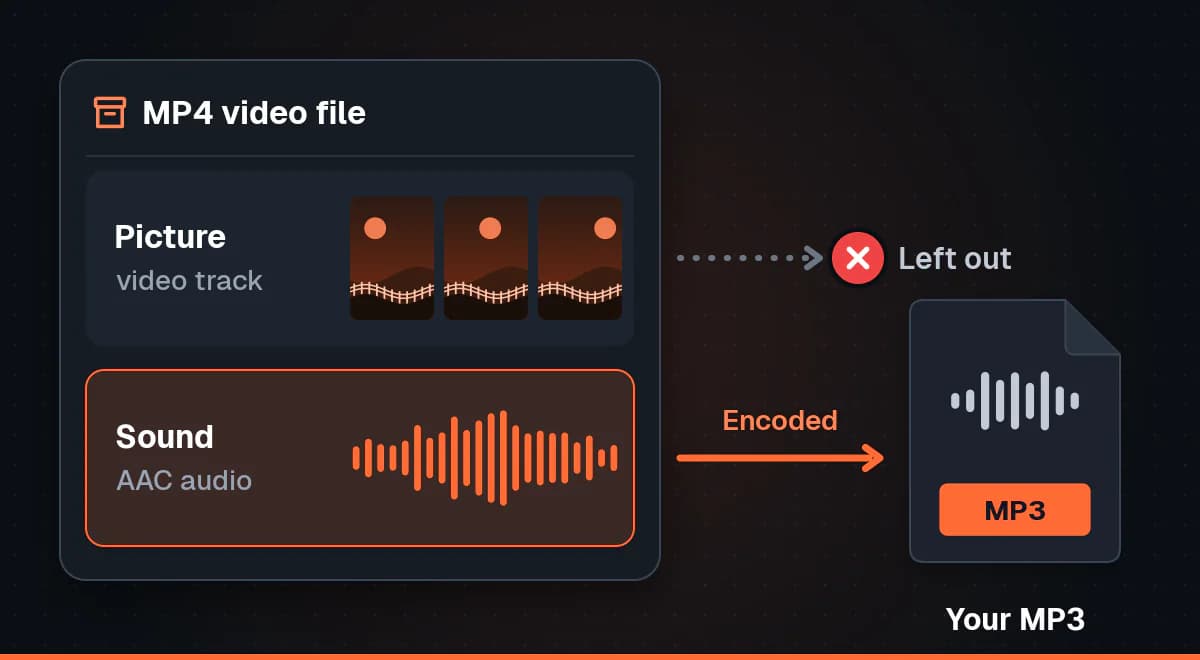
The audio in the MP3 is the audio TikTok delivered with the video, including whatever the creator mixed in: their voice, background music, effects and any noise in the room. If you want to know more about the video side of this, and why the MP4 itself needs no conversion, read our guide on saving a TikTok link as a video file.
Quality comes from the source
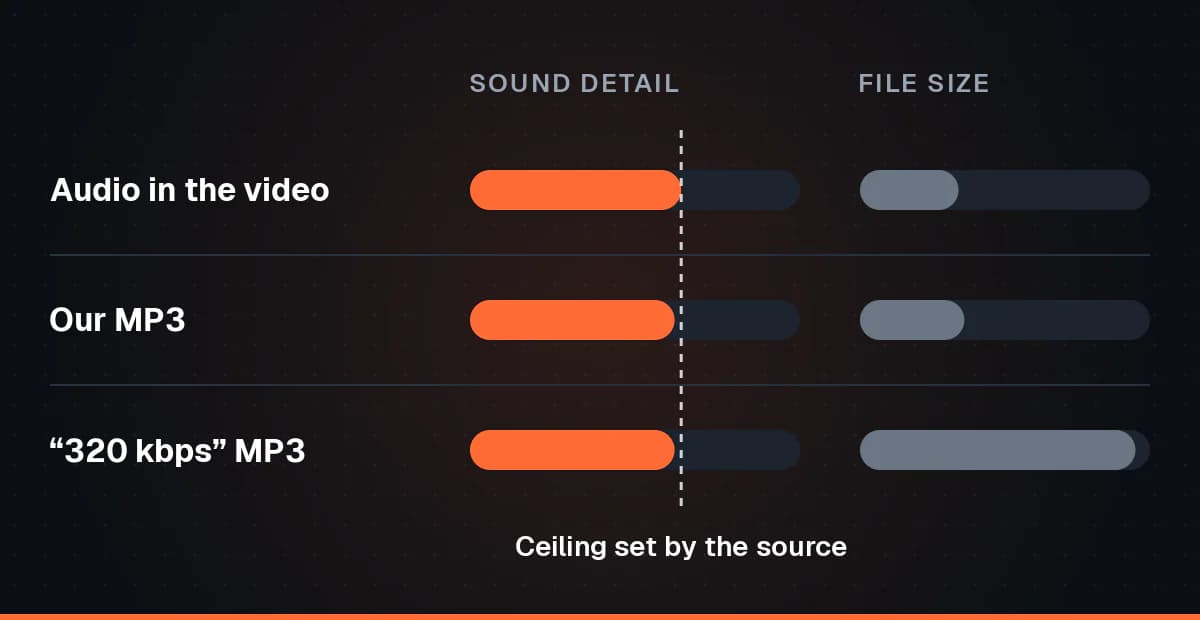
TikTok compresses the sound of every upload, just as it compresses the picture. Once detail has been thrown away, no later step can put it back. So the MP3 can match the quality of the audio in the video, but it cannot improve it. A tool that promises "studio quality" or "320 kbps" from a TikTok is describing the size of its output, not the sound you will hear.
What bitrate means, in plain words
Bitrate is how much data is spent on each second of sound, usually written in kilobits per second (kbps). More data per second lets an encoder keep more of the finer detail, and it also makes the file bigger. Encoding already compressed audio at a very high bitrate gives you a larger file with the same sound, because the extra bits have nothing new to describe.
Our MP3 is encoded at a fixed bitrate that suits speech and music from social video. For a voiceover, a podcast clip or casual listening, the difference from the original is very hard to hear. If you are going to edit the audio seriously, download the MP4 instead and work from its original AAC track, which avoids one round of encoding.
Why there is no exact file size before you download
The video options show the real size of a file TikTok already serves. The MP3 is different: it does not exist until you press the button, because it is encoded on the spot from the audio track. Nothing can be measured in advance. Where a size appears next to the MP3 it is marked with a tilde as a calculation from the length of the clip, not a weighed figure. As a rough guide, a minute of audio usually comes to a few megabytes, far smaller than the video.
How to download TikTok audio as MP3, step by step
The steps are the same everywhere: copy the link, paste it, press MP3. What changes from device to device is how you copy and where the file ends up. Both link forms work, the short one from the app and the full tiktok.com address with /video/ and a number. If you are not sure which one you have, see how to tell the two TikTok link types apart.
On Android
- In the TikTok app, tap Share on the video, then Copy link.
- Open Chrome, Samsung Internet, Firefox or another browser.
- Go to the TikTok downloader, long-press the input box and tap Paste.
- Start the lookup and wait for the download options to appear.
- Tap the MP3 button.
- Open the finished file from the download notice, or later from Downloads in Files by Google or My Files.
An MP3 will not show up in your gallery, because galleries list photos and videos. Music players and file managers see it straight away.
On iPhone and iPad
- In the TikTok app, tap Share, then Copy link.
- Open Safari, or Chrome if you use it.
- Go to the TikTok downloader, tap the input box and tap Paste.
- Start the lookup, then tap MP3.
- Confirm the download if Safari asks. The download arrow in the address bar shows progress.
- Open the Files app and look in Downloads. Tap the MP3 to play it.
Photos only holds pictures and videos, so there is no Save to Photos step for audio. Keep the MP3 in Files, or use the share button to open it in an app that plays or edits sound. The iPhone has other download quirks worth knowing, and our walkthrough of downloading TikToks with Safari on an iPhone covers them.
On a Windows PC, Mac or Chromebook
- Open the video on tiktok.com and copy the address bar, or use a short link someone sent you.
- In a new tab, open the TikTok downloader and paste with Ctrl+V, or Cmd+V on a Mac.
- Start the lookup and click MP3.
- The file goes to your Downloads folder. The browser download list, Ctrl+J in most browsers on Windows, opens it directly.
From there the MP3 drops into CapCut, iMovie, Audacity or any other editor as an audio clip. Everything happens on our side and in your browser, with no app and no account, and how the site works explains the path a link takes.
Original sounds and licensed songs are not the same
Tap the spinning disc or the sound name at the bottom of a TikTok and you land on its sound page. That page tells you what kind of audio you are listening to, and it matters a great deal for what you can do with an MP3 of it.
- Original sound. Labelled "original sound" with a creator's name. This is usually audio the creator recorded themselves: talking to the camera, a voiceover, a sketch, their own instrument. It still belongs to that creator.
- A licensed track. Shown with a song title and an artist. This is commercial music that TikTok has licensed for use inside the app. That licence covers TikTok, not a copy on your phone.
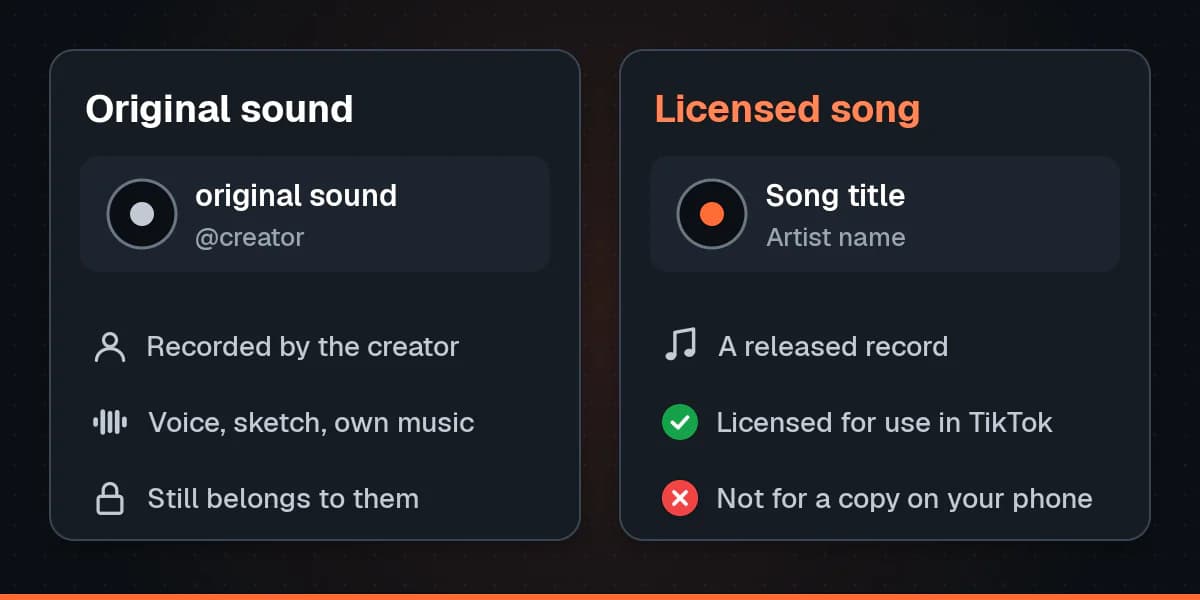
Some "original sounds" are someone else's song under a new name, so the label is only a hint. If it sounds like a released record, treat it as one.
Good reasons to save TikTok audio
- Your own voiceovers and original sounds, kept as a personal backup of content you made. For bigger backups, see getting your own uploads back from every platform.
- Reference while editing, such as timing cuts in CapCut to a sound you are allowed to use.
- A voice note or clip a friend made, saved with their permission.
- A lecture, tutorial or talk you want to listen to later, where the creator is happy for it to be saved.
If what you really want is a song you heard on TikTok, the right move is not an MP3. The sound page shows the title and artist, and TikTok sometimes links to the track on a music service. Add it to your library there. The artist gets paid, you get a far better quality recording than a social video soundtrack, and it stays yours to play offline within that service.
Saving a sound inside TikTok without downloading
Many people searching for a TikTok sound downloader only want to use the sound in a video of their own. TikTok already handles that, and it keeps the licence intact, which a file on your phone does not.
- Tap the sound name or the spinning disc on the video to open the sound page.
- Tap Add to Favorites to keep the sound for later.
- To record with it now, tap Use this sound. The camera opens with the audio already loaded.
- Later, find it in the Favorites section of your profile, where sounds usually have their own tab, or in the Favorites list when you add a sound while recording.
Favorites is also where saved videos and effects live, and our guide to finding your saved and favourite TikToks shows where each tab sits. The catch is that a favourited sound only exists inside TikTok. If the sound is removed or muted, it disappears from your list, and you cannot play it offline in another app.
Four ways to keep a TikTok sound, compared
| Method | File you keep | Quality | Effort | Works offline |
|---|---|---|---|---|
| Our MP3 option | Yes, an MP3 | The video's own audio, encoded once to MP3 | Paste a link, press one button | Yes |
| Download the MP4 and extract the audio yourself | Yes, in whatever format you export | The original AAC track if you copy it without re-encoding | Two steps plus an editor or converter | Yes |
| Screen or voice recording | Yes, usually a video or voice memo | Lower, and it can pick up notifications and room noise | Play the whole clip in real time | Yes |
| TikTok's Add to Favorites | No, it stays in the app | Whatever TikTok streams | One tap | No, and only usable inside TikTok |
For most people the MP3 is the quickest route to a file. If you also want the clip itself, grab the MP4 in the same visit: the downloader offers both, and the video comes without the watermark in HD and Standard, as our guide to TikTok downloads without the logo explains.
Troubleshooting
No MP3 option is offered
- Check the link. A profile link, a sound page link or a hashtag page is not a video. Copy the link from the Share menu of the video itself.
- Check the post type. Photo posts and live broadcasts have no video file to take audio from. See the photo post section below.
- Try again shortly. Converting audio needs a working encoder on our side, and when it is unavailable we hide the button rather than show one that fails.
The MP3 is silent or the sound is missing
TikTok sometimes mutes the audio of a video, usually because a song in it was flagged for copyright. The app then shows a note that the sound is unavailable, and the file it serves carries silence or no sound at all. An MP3 made from that file is silent too, because there is nothing in the audio track to convert. Play the video in TikTok first: if it is quiet there, no downloader can bring the sound back.
A photo post has a sound but no MP3
Photo mode posts play like a video, but they are a set of still images with a sound attached, and no video file sits behind them. Our downloader for TikTok does not support photo posts, so it has no audio track to turn into an MP3 for them. To keep the sound for your own videos, open its sound page from the post and add it to your Favorites.
The file will not play or will not set as a ringtone
- Let the download finish before opening the file. A half-saved MP3 looks broken.
- Check the extension is .mp3. If your browser saved it without one, rename it.
- Try another player, such as VLC, before deciding the file is damaged.
- Ringtones depend on your phone. Many Android phones accept an MP3 as a ringtone from the sound settings or a file manager. iPhones expect a different audio format and a short clip, so an MP3 will not become an iPhone ringtone without converting it first.
The video is private or restricted
Private, friends only and login restricted videos are not supported. We reach TikTok the way a logged out visitor does, so a video that is not public has no audio we can get to. If it is a friend's clip, ask them to send you the sound directly.
Warning: Important
Most music on TikTok is copyrighted. Only download audio you own or have permission to use, and do not upload, share or sell MP3s of commercial songs. To keep a song you found on TikTok, look it up from the sound page and add it on a licensed music service.
FAQ
Do I need an app or an account for a TikTok MP3 download?
No. The MP3 option works in any browser on a phone, tablet or computer, with nothing to install and nothing to sign up for.
Can the MP3 sound better than the TikTok?
No. It is made from the audio track of the video, so the video sets the ceiling. A higher bitrate would only make the file larger.
Does a vm.tiktok.com or vt.tiktok.com link work?
Yes. Short links copied from the app and full tiktok.com video addresses both work.
Where is the MP3 saved?
In the Downloads folder on Android and on computers. On an iPhone or iPad it goes to Downloads in the Files app, since Photos does not store audio.
Can I download a TikTok sound from its sound page link?
Paste the link of a video that uses the sound instead. The MP3 comes from a video's audio track, and a sound page is not a video. If the sound is an original sound you made, any of your videos that use it will do.
Can I use a downloaded song in my own TikTok?
Use it through TikTok instead, with Use this sound on the sound page. That keeps the licence TikTok holds for the track. Uploading an MP3 of a commercial song as your own audio can get the video muted.
Should I use the MP3 or the MP4 for editing?
For a quick edit the MP3 is fine. For careful work, the MP4 keeps the original AAC audio, and editors such as CapCut and iMovie can detach it from the picture.
Conclusion
Getting a TikTok to MP3 takes a link and one button, and the result sounds just like the video it came from. Use it for your own voiceovers, original sounds and clips you have permission to keep. For songs, go through the sound page to a licensed music service, and for sounds you want to record with, Add to Favorites is all you need. When you have a link ready, paste it into our TikTok MP3 downloader.